
Terminal profiles
Environment variables
Set terminal environment values for all programs in that profile's shell. Use a command override when a value should apply only to one saved run.
Set variables
Open the profile editor, expand Environment variables, and add name/value rows. For the demo API, use APP_ENV with value development and PORT with value 8080. Save the profile and accept the reinitialization prompt when you are ready to replace its existing shell.
Names use shell-variable syntax, such as APP_ENV; duplicate names after trimming are rejected. The TERMINALIS_ prefix belongs to the app and cannot be assigned. A value is text, so enter 8080 in the editor without extra shell quotes. In YAML examples, quote numbers and booleans so they remain strings.
Profile values are applied after supported shell initialization, overriding matching inherited or startup-file values. Profile environment setup requires Bash, Zsh, or Fish. They do not change other profiles or your system environment. Command environment overrides take effect for that run only.
For CLI launches, repeat
--env KEY=VALUE for each explicit variable. Caller exports are not automatically forwarded, and
CLI values remain literal after caller-shell expansion. They apply to that invocation only; the
new profile's saved environment remains empty.
Variable references
Values can contain $NAME or ${NAME} references. Typing $ in the editor offers known names. For example, set DEMO_ROOT to /tmp/documentation-demo, then LOG_DIR to ${DEMO_ROOT}/logs. A value such as $PATH:./bin extends the inherited PATH.
References expand in dependency order when the shell starts or the command runs. Keep dependencies acyclic: FIRST=$SECOND and SECOND=$FIRST cannot be resolved and are rejected. Escape a dollar as \$ when it must be literal. These are environment references, not a general-purpose template language.
In 3.7.0, profile and saved-command values preserve spaces, leading/trailing whitespace, quotes,
and backslashes automatically. Enter the value you want, without wrapping it in shell quotes.
For example, enter hello world rather than "hello world". Command overrides follow the same
rules, with command values taking precedence over profile values, then system values. A same-name
reference such as $PATH:./bin extends the value from the lower scope.
When updating older saved commands, remove extra wrapping shell quotes from their environment
fields. Expressions such as $(...), shell operators, and authored quotes are now literal text.
Move shell evaluation into the command script when needed. CLI --env values keep their separate
fully literal behavior, including dollar signs.
Required variables
A portable terminal or attached command can declare requiredEnv, listing names whose values must be available before that command starts. This lets a shared setup require DATABASE_URL without including a person's value. Terminal and command requirements are checked together in the active shell after command overrides are applied; a missing or empty value prevents the script from running and prints an error.
The current editor preserves imported requirements but does not expose a required-variable list. Define that list in the portable file, or choose Name only during export. Supply the required value through the local profile environment, a command override, or the active shell. For a temporary Bash/Zsh session value, export DATABASE_URL=demo-only-value makes it available to that shell; saving it in the profile is the persistent alternative. Required-variable checks support Bash, Zsh, and Fish; a required run in an unsupported shell is rejected.
Hidden values
Check Hide beside a profile or attached-command value to mask it in the editor and store it using Terminalis's xor1 representation. The eye control reveals it temporarily; leaving the field masks it again. Changing only Hide does not require a shell restart.
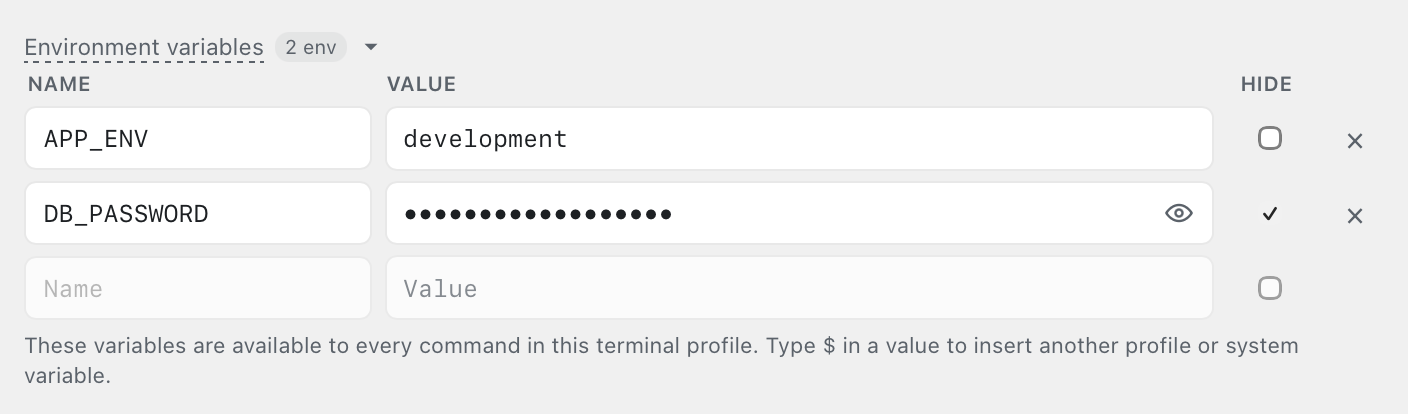
Hide uses reversible obfuscation, not encryption. Terminalis decodes values for execution and keeps them in memory. Hide does not remove old plaintext backups or conceal values printed by your programs. MCP access exposes decoded profile values, including hidden ones. When sharing a file, use Name only to omit a value rather than relying on Hide.